Well, there's nothing like a barking dog running towards you that gets you up a 14% grade hill ASAP on your bike. Dogs and bikes are not a good combination and it's hard finding a rural road that doesn't have a large dog protecting their home. I wish I had a safe place to ride.
Last weekend I got a flat tire 7 miles from the car. The one time I don't have my patch kit is the day this happens. I called up hubby to let him know I'll be a lot later than I planned due to a flat tire. When he asked where I was, I told him towards Nebraska City and heading back to Peru. After I hung up (always have a cell phone when riding) I realized I was 2 miles north of road "R" and he could pick me up. The Steamboat Trace trail is practically desolate with about 3 intersecting roads along a 25 mile stretch so I got lucky. I called hubby back up and said he could pick me up and gave him directions. Thankfully I only had to walk 2 miles. I'm SO glad it was a Saturday or I would have been stuck walking back the entire way. Hubby has banned me from riding the trail now so I need to find a route that works closer to home.
I made it 11 miles today so I'm feeling good after healing up from two popped ribs. I'm wondering if reaching 100 miles this year is out of range and need to settle for something smaller like 50 miles.
Friday, April 25, 2014

Graphic 45 "By The Sea" Mini Album
I ended up putting the "Couture" album away for now. It's giving me a headache because I'm so picky. I need to learn to relax. It doesn't help I hit boredom about 3/4 way through a project. The joys of no attention span..was that a bird?
The mini album tutorial is from SoMuchScrap. Check out her Etsy store as she has some amazing mini albums. The "Couture" album is from her as well. The tutorials are easy to read and put together.
These are some of the pages I've made. I don't glue anything down until I know what I want. There's nothing worse than realizing you did something wrong and can't change it. I have to order the paper and it's not cheap or easy to find so if you mess up, good luck. Graphic 45 doesn't make enough paper and it gets frustrating when every online store is sold out.

She used Spellbinders Label 21 to make the edges. I couldn't find it in any store and Amazon wanted 20-25 dollars. I hate how much Spellbinders charges for their stuff and 5 dollars per metal die is insane. Even if you find them on sale, they are still overpriced. So… I went looking for SVG sets that had a similar design and found one from Bird's Cards that was perfect. I went back to the Spellbinders site and wrote down the measurements. I work better in MTC for SVG files as you can put fractions in for sizes. I then saved it as an SVG file and imported it into Design Space. I thought MTC has a nesting function but couldn't find it.
Cricut Design Space is still goofy to work with and I forgot it doesn't import anything true to size. Grrr. I managed to use the largest design and get it close enough to the original numbers from Spellbinders and scaled it to size. I used my Explore to cut out the templates.

My only gripe with So Much Scrap's tutorials is that her pages run to the 1/8 size like 7 5/8 and then has you center the die. Good luck finding 3 11/16 as center point if you OCD as you have to center the Graphic 45 papers as well. Next time I do one of her albums, I'm using normal numbers that fit nicely.
I can't wait for the rest of my stuff to come as Amazon finally got some more paper in and ordered it.
The mini album tutorial is from SoMuchScrap. Check out her Etsy store as she has some amazing mini albums. The "Couture" album is from her as well. The tutorials are easy to read and put together.
These are some of the pages I've made. I don't glue anything down until I know what I want. There's nothing worse than realizing you did something wrong and can't change it. I have to order the paper and it's not cheap or easy to find so if you mess up, good luck. Graphic 45 doesn't make enough paper and it gets frustrating when every online store is sold out.
She used Spellbinders Label 21 to make the edges. I couldn't find it in any store and Amazon wanted 20-25 dollars. I hate how much Spellbinders charges for their stuff and 5 dollars per metal die is insane. Even if you find them on sale, they are still overpriced. So… I went looking for SVG sets that had a similar design and found one from Bird's Cards that was perfect. I went back to the Spellbinders site and wrote down the measurements. I work better in MTC for SVG files as you can put fractions in for sizes. I then saved it as an SVG file and imported it into Design Space. I thought MTC has a nesting function but couldn't find it.
Cricut Design Space is still goofy to work with and I forgot it doesn't import anything true to size. Grrr. I managed to use the largest design and get it close enough to the original numbers from Spellbinders and scaled it to size. I used my Explore to cut out the templates.
My only gripe with So Much Scrap's tutorials is that her pages run to the 1/8 size like 7 5/8 and then has you center the die. Good luck finding 3 11/16 as center point if you OCD as you have to center the Graphic 45 papers as well. Next time I do one of her albums, I'm using normal numbers that fit nicely.
I can't wait for the rest of my stuff to come as Amazon finally got some more paper in and ordered it.
Tuesday, April 15, 2014
Graphic 45 "Botanical Tea" Mini Album
I've also been working on this mini album. The pages fold out and you can use them as a card file as well. This has taken forever because of all the paper cutting and having to find the pages where everything is. I finally had to just do my own thing as nothing was easy to find.
Front cover: I changed the front cover by using my Explore to cut the frame and fussy cut the roses. I just didn't like the front and ran out of the paper she had used. Cricut has some nice frames to choose from and it was great not having to design my own.

Inside page: My Explore cut the pink rose tag out.

Fold out page: I loved all the roses in this paper and had to use them.

Insid fold out page:

Back page of 1st section and start of section 2: The flower pages open up into another page

Inside page

Inside page of section 2:

Start of fold out page:

Inside of section two. I used the Explore to cut out the cages and the filigrees using designs from their software. Silhouette studio designs for bird cages were minimal and pretty sub standard. I apologize for it being turned wrong. I love this page.

Back page of section two/front page of section three:


Front cover: I changed the front cover by using my Explore to cut the frame and fussy cut the roses. I just didn't like the front and ran out of the paper she had used. Cricut has some nice frames to choose from and it was great not having to design my own.
Inside page: My Explore cut the pink rose tag out.
Fold out page: I loved all the roses in this paper and had to use them.
Insid fold out page:
Back page of 1st section and start of section 2: The flower pages open up into another page
Inside page
Inside page of section 2:
Start of fold out page:
Inside of section two. I used the Explore to cut out the cages and the filigrees using designs from their software. Silhouette studio designs for bird cages were minimal and pretty sub standard. I apologize for it being turned wrong. I love this page.
Back page of section two/front page of section three:
Those pages opened up:
Inside pages:
Section 3:
Inside pages of section 3. They aren't finished yet as the paper she used I can't find or is already cut up.
I'm hoping to get this finished soon. It's a lovely album and the paper is gorgeous.
Graphic 45 "Couture" mini album
Been working on this for some time and finally have most of it put together. I really loved the tutorial I bought and the extra details I've added in make it look that much better. This is page one:

Inside page of page one:
 Page 2:
 Inside of page 2:

Page 3:

Inside of page 3:

Page 3 folded up:

Page 4:

Inside of page 4:

Page 5:

Inside page 5:

Page 5 folded up:

Page 6:

Inside of page 6:

Page 6 opened up:

Page 7:
 Inside of page 7:
 Page 7 folded:

Page 8:
 Inside of page 8:
 More of page 8:

Page 9:
 Inside of page 9:
 Page 9 opened:

I still have work to do on it and finish gluing everything down. Fussy cutting has taken some time but I like doing it.
Inside page of page one:
Page 3:
Inside of page 3:
Page 3 folded up:
Page 4:
Inside of page 4:
Page 5:
Inside page 5:
Page 5 folded up:
Page 6:
Inside of page 6:
Page 6 opened up:
Page 7:
Page 8:
Page 9:
I still have work to do on it and finish gluing everything down. Fussy cutting has taken some time but I like doing it.
Friday, March 28, 2014
First Baby Card With Explore

I just did my first card on the Explore. I LOVE how this turned out. I found a card via Pinterest and used the idea. I'm not that talented to come up with my own yet. She used real buttons, ribbon and better paper, but this came out great.
The Explore scored the card and did the writing. The pens fit in perfectly and flow nicely. Design Space still needs a centering tool if you want to write. I did design this in MTC and moved it over as a SVG file. I don't know how the editing of fonts works in Design Space as I haven't done it yet. While the software is limited, I really like it.
I really like that you can load the mats via color. I had five colors and just loaded the mats. If I was good, I could add the papers on the mats, change everything to one color and go. The last mat didn't load right and it looks like it makes you start over with the first one..PC needs to give an option to choose which mat you want to load first. I fixed it by closing the eye on all the pieces I didn't want cut.
If you are looking for a fast cutter, this isn't it. My Cameo can do the cuts twice as fast, but I love the accuracy of the cuts on the Explore. I used the light card stock setting and paper from Michael's.
Monday, March 24, 2014
First Intricate Cut On The Explore
This test cut doily is from Monica's Creative Room and is cut at a 2.5 inches. Her patterns are extremely intricate and detailed and challenge any cutter. All things considered, this cut out beautifully. I accidentally tore some of it and the center came out better than I expected. It took about 15 minutes to cut and was used on the light card stock setting. I used JoAnn's paper. The circles are true circles and even the small circles that are the size of a pin prick worked.
I am really impressed with Provo Craft's Explore machine after this test cut. I won't be cutting anything this intricate all the time, but for me this is acceptable given the parameters. Loving this machine so far.

I am really impressed with Provo Craft's Explore machine after this test cut. I won't be cutting anything this intricate all the time, but for me this is acceptable given the parameters. Loving this machine so far.
Monday, March 17, 2014
First Impressions On The Cricut Explore
I picked up my Cricut Explore on Saturday and set it up on Sunday. While I haven't played in full detail with it, I thought I'd give my first impressions. You have to remember that I've owned a Black Cat Cougar and I have a Cameo so I'll compare to those. I paid for this machine and I don't endorse or support any one machine. My Cougar was a PITA so I sold it. I like my Cameo but I get tired of always having to tape my paper down and mess with the settings. There is no wrong machine out there. Find one you like and use it.
If you truly despise Provo Craft products, don't bother reading any further. There are plenty of other machines to choose from. I won't censor any hate responses as we all have opinions and are welcome to express them.
If you are looking for a machine that does incredible cutting details this isn't the machine for you. While I haven't done anything terribly detailed and haven't had issues, I know some people love cutting intricate tiny things and I don't think the Explore will do it. My Cameo makes better detailed cuts. *edited* This machine does fabulous intricate cuts. It rivals my Cameo.
This machine is meant for the basic crafter who doesn't want to do tons of editing and designing. The same is true for the software. I like that. Just pick a design and cut it out. I don't always want to spend hours making a design.
The machine itself:

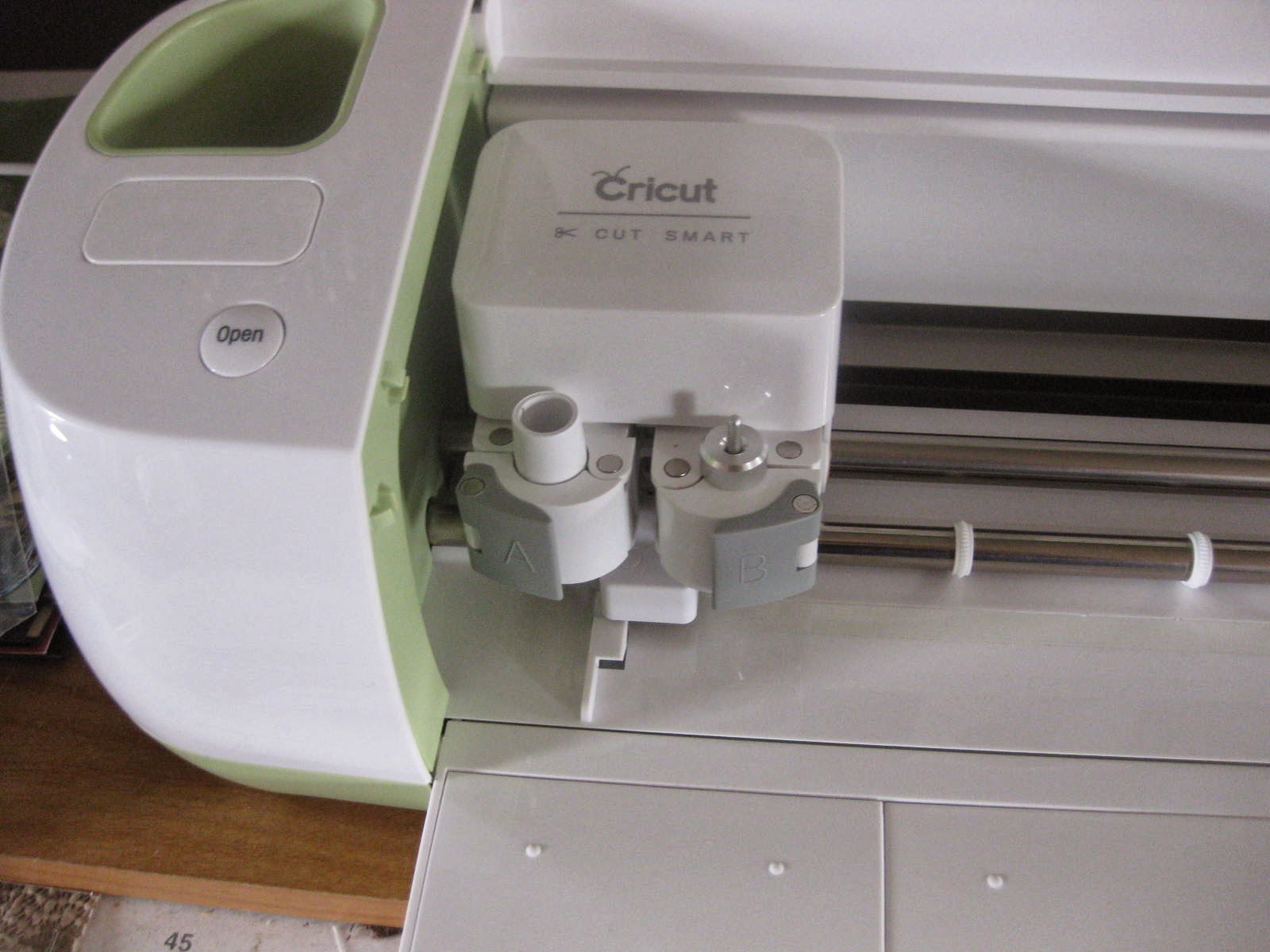
I like that it's heavy and stable. There are tabs where you can slide the mat in and not have to worry about alignment issues. There are four rollers. It's a sleek looking design and love the built-in storage. Nothing looks cheap and the plastic is solid. It holds the mat solidly and is stable. The dual head tabs are easy to open/shut as well.
It is the quietest machine I've owned. My Cameo always sounds horrible and screechy, almost like nails on a chalkboard. It drives me nuts. The Explore has a nice quiet humming as it cuts. It does beep when it goes up and down but it's nice to just let the machine cut. However; I didn't find a speed setting so you are limited to the speed of the machine. The speed isn't slow, but it isn't fast either.
The dual head is wonderful. I love that I can put a marker in (comes with a silver marker) and just draw. The marker fits in perfectly. There isn't any dragging, loss of ink, or smearing. I went and purchased the marker set off of HSN. My Cameo pens are crap so this was a welcome change. It would be great if Provo Craft designed a pen set, but someone will probably find a way to fit regular pens in.
The Software:
You do have to be on the internet to use it. I haven't had any problems with the software lagging or getting hung up. What I like is that I can sign in on any computer and have it ready to go. I don't need two copies of the software for my laptop and my desktop. I don't have to have tons of designs stored on two computers or have to constantly bring designs over from one computer to the other.
If you want full editing/drawing/scanning/and complete control, this software isn't for you. It is meant for your to pull a design out of their collections, do some basic editing and then cut. However; thanks to everyone asking for full SVG usage you can import a SVG from another program and use it. The SVG does NOT come in true to size. If you buy something from SVG Cuts, you will have to resize everything. I did ask on PC's Facebook page if they would change that. Maybe they will, maybe they won't. I also asked if they would put a centering and some alignment options in. There isn't a basic shapes file either.
There were a couple of times when I wanted to use the pen, but couldn't separate the layers or pieces to draw out the design.
I did import an SVG file from MTC that cut out just fine.
I love that when you get to the cutting stage, the software automatically puts everything on the mat in a way to save paper. I hate dragging everything around to make it fit. You can change that if needed before you cut. If you decide to use different paper on the same mat, change the design colors to fit on the first mat or it assumes you are using a different mat for each color.
So far the dial is accurate. It's nice to just set it and go. I've only done card stock as I don't have any vinyl. You can go in and change the pressure settings or get different cutting materials when you get to the cutting screen. The basics are covered on the front dial. As mentioned, I didn't find a speed setting.
The software has worked on both my Mac and my Windows laptop.
It looks like the Explore has some bluetooth or wireless device inside as my computer picked it up but it wouldn't sync.
Provo Craft did a nice job on this machine. The only thing I wish is that they included the scoring tool in the package. Will it put the other companies out of business? No. Does it have the most amazing software? No. The Explore was meant for the home crafter who just wants to cut out designs and go. That's it.
What remains to be seen is if they keep their promise of a PnC and a wireless solution.
If you truly despise Provo Craft products, don't bother reading any further. There are plenty of other machines to choose from. I won't censor any hate responses as we all have opinions and are welcome to express them.
If you are looking for a machine that does incredible cutting details this isn't the machine for you. While I haven't done anything terribly detailed and haven't had issues, I know some people love cutting intricate tiny things and I don't think the Explore will do it. My Cameo makes better detailed cuts. *edited* This machine does fabulous intricate cuts. It rivals my Cameo.
This machine is meant for the basic crafter who doesn't want to do tons of editing and designing. The same is true for the software. I like that. Just pick a design and cut it out. I don't always want to spend hours making a design.
The machine itself:
I like that it's heavy and stable. There are tabs where you can slide the mat in and not have to worry about alignment issues. There are four rollers. It's a sleek looking design and love the built-in storage. Nothing looks cheap and the plastic is solid. It holds the mat solidly and is stable. The dual head tabs are easy to open/shut as well.
It is the quietest machine I've owned. My Cameo always sounds horrible and screechy, almost like nails on a chalkboard. It drives me nuts. The Explore has a nice quiet humming as it cuts. It does beep when it goes up and down but it's nice to just let the machine cut. However; I didn't find a speed setting so you are limited to the speed of the machine. The speed isn't slow, but it isn't fast either.
The dual head is wonderful. I love that I can put a marker in (comes with a silver marker) and just draw. The marker fits in perfectly. There isn't any dragging, loss of ink, or smearing. I went and purchased the marker set off of HSN. My Cameo pens are crap so this was a welcome change. It would be great if Provo Craft designed a pen set, but someone will probably find a way to fit regular pens in.
The Software:
You do have to be on the internet to use it. I haven't had any problems with the software lagging or getting hung up. What I like is that I can sign in on any computer and have it ready to go. I don't need two copies of the software for my laptop and my desktop. I don't have to have tons of designs stored on two computers or have to constantly bring designs over from one computer to the other.
If you want full editing/drawing/scanning/and complete control, this software isn't for you. It is meant for your to pull a design out of their collections, do some basic editing and then cut. However; thanks to everyone asking for full SVG usage you can import a SVG from another program and use it. The SVG does NOT come in true to size. If you buy something from SVG Cuts, you will have to resize everything. I did ask on PC's Facebook page if they would change that. Maybe they will, maybe they won't. I also asked if they would put a centering and some alignment options in. There isn't a basic shapes file either.
There were a couple of times when I wanted to use the pen, but couldn't separate the layers or pieces to draw out the design.
I did import an SVG file from MTC that cut out just fine.
I love that when you get to the cutting stage, the software automatically puts everything on the mat in a way to save paper. I hate dragging everything around to make it fit. You can change that if needed before you cut. If you decide to use different paper on the same mat, change the design colors to fit on the first mat or it assumes you are using a different mat for each color.
So far the dial is accurate. It's nice to just set it and go. I've only done card stock as I don't have any vinyl. You can go in and change the pressure settings or get different cutting materials when you get to the cutting screen. The basics are covered on the front dial. As mentioned, I didn't find a speed setting.
The software has worked on both my Mac and my Windows laptop.
It looks like the Explore has some bluetooth or wireless device inside as my computer picked it up but it wouldn't sync.
Provo Craft did a nice job on this machine. The only thing I wish is that they included the scoring tool in the package. Will it put the other companies out of business? No. Does it have the most amazing software? No. The Explore was meant for the home crafter who just wants to cut out designs and go. That's it.
What remains to be seen is if they keep their promise of a PnC and a wireless solution.
Subscribe to:
Posts (Atom)