Showing posts with label Embird. Show all posts

Wednesday, May 20, 2009

Alignment Stitches With Embird

I had someone ask what fusible fleece is.  Fusible fleece is a thin batting that you fuse to your fabric.  It's not fusible batting which is much thicker.  

Here's what I was talking about when I was using Embird to make an alignment stitch.  Sticky stabilizer is like contact paper and is used if you don't want to hoop something.  For the quilt block I am working on, hooping each design over and over would stretch out the fabric and distort it.  However; I think I'm doing a good job of that on my own.  LOL.  Here's what sticky stabilizer looks like:
From Embroidery Designs
On the first test out I drew horizontal/vertical lines on the stabilizer but it didn't work as I was still off.  I tried several times to line with the lines I had drawn on the fabric to the lines I had drawn on the paper.  Then I realized the lines I had drawn weren't done right with the marks on the hoop as I did the alignment stitch on it.  Sigh.

Here's what the fabric looks like on top of the hoop.  You can see the references lines I've drawn.  My design HAS to be perfectly aligned with those lines or it won't fit.  I know the lines aren't perfectly straight when I placed it on the stabilizer either because I'm not that good.

From Embroidery Designs
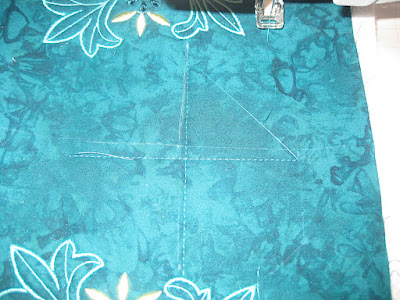
In Embird I can do an alignment stitch that does a horizontal/vertical set of stitches so I can double check my if my marks are exactly centered on the hoop.

From Embroidery Designs
Errr...  I think I'm just a little off.  If I just guessed my design would have gone over into the other design.  Sigh.  I'm really pathetic at lining this up.  LOL.

I take out the stitches and I get needle holes in the stabilizer for exact placement.  I thought about doing that first, but it actually works better if stitch over the fabric first.

From Embroidery Designs
I put the my fabric lines up with the perforated stabilizer and it works perfectly every time.  And yes; I have tried it with the grids on the lined paper.  You still need center marks on the sticky part. 

It would be totally awesome if the machine gave you this option.  Or if the overpriced 4D Extra would do this as part of their editing.  If you are looking for embroidery software, buy Embird.  The name brand software programs aren't awful, they are just extremely limited in what they can do and they force you to keep buying up until you spend a fortune on their TOL software.    

Monday, March 16, 2009

4D Extra And Importing Fonts

It was great having my family come to visit over the weekend.  My mom loved the table runner.  
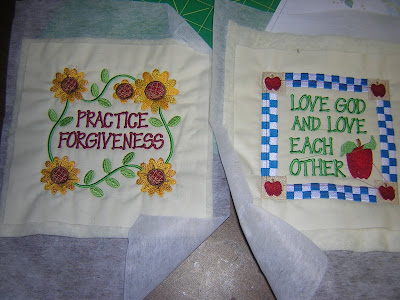
I was showing her my embroidery software as she loved the set below of embroidery blocks I had made.  There are 9 blocks in all, but only 2 in the picture.  I said I really needed a font that matched but the company I bought them from wanted 20 dollars for it.  I really needed a bigger size as well.  My editing skills are still really pathetic.

From Blogger Pictures
Then she said she had a cricut? and she could download free fonts off the internet instead of buying the expensive sets the company made.  She had purchased their software and my dad figured out how to download the fonts into it.   I wondered if I could do this with my 4D Extra as I knew it had a font section.  We downloaded a font and and it worked!!  Then we played with the size and the different ways of stitching out the font.  Way cool!!   I can add fonts to my machine embroidery to match the designs.  

I just have the basic Embird program so I don't know if I can download fonts with it.  I love both programs.

Wednesday, March 04, 2009

Another Electronic Orgasm

The first electronic orgasm was my Ipod Touch.  I've wanted a Kindle 2 for the past week or so.  My house is really small and books take up so much space.  My husband's collection of hardback comic books takes up most of it.  LOL.  Men.  They never grow up.  Which for me is a good thing and I don't mind.

Back to the Kindle 2.  My concern is wireless connection.  Or possible lack of it.  And *cough* the price.  After getting a Yahoo! Answer back that I could just use my USB port to transfer books with the Kindle 2, it's more tempting.  Then....  I discovered I could download Kindle for FREE on my Ipod Touch.  Does it work?  You betcha.  I've downloaded a couple of books by err..borrowing someone's wireless internet that my Itouch has found when doing a scan.  Maybe I need to go wireless.  I don't like "borrowing" even if it is for less than 30 seconds. 

 *A couple of hours later after feeling guilty about borrowing someone else's wireless connection--  I followed the signal to a neighbor and said that I was getting wireless internet from her house and if she knew it.  I told her how excited I was to download some books from her service.  She started laughing and said it was okay.  I feel much better but hate to take someone else's connection.  I wish I could just download directly from Amazon right to my Itouch*

You can even get quilting books on Kindle.  Not great ones, but it's nice to know that.  Maybe I should email the companies and beg for them to put quilting books on Kindle.  

Back to more quilting/embroidery related subjects.  I got a box today!!  Woo Hoo!   Wanna see what I got?

From Quilted with Love

Enough bobbin thread to last a lifetime. Total yardage? 20,000. I bought some NEB prewound bobbins as they work too. The only catch is that the Topaz won't know to stop when you run out of thread. If I wind the bobbins on the Topaz bobbins, the machine stops. I love that there isn't a low bobbin sensor where you have to guess how much you have left.

Having real thread color cards is almost essential when doing machine embroidery. The software doesn't always transfer colors right especially if the digitizer uses a different format that you have to convert or a different brand of thread. Embird and 4D extra will convert threads for you. Embird does a better job of it. If you need to order thread, you have the numbers for easy ordering. What I hate is when companies charge outrageous prices for their thread charts..like 40 bucks. Forget it.

Anyway, it's been a good day.  

Thursday, February 26, 2009

"Dingle Dongle"

This was a few weeks ago:

I about burst out laughing at the dealer when she talked about a "dongle" when I purchased the Topaz and software.  What the heck is a dongle??  Of course my mind is in the gutter and I'm thinking, "Dingle Dongle".  Sigh.  Now every time I hear/read the word dongle, I giggle.

After I set up the 4D Extra software (which was a huge PIA) I'm guessing a dongle is an external hard drive.  A very expensive hard drive.  I'm still learning the software and find myself using Embird and just downloaded "Ambassador", a free version from Micropulse.  As far as I know, 4D Extra and Embird don't give separate color layers to print out, since the Topaz doesn't have a touchscreen.  Ambassador does do that.  

My only gripe about software, none of it is made for the Mac operating system.  Good thing I have XP on the other side of my hard drive.

Sigh.  Now I'm giggling again.  

Monday, September 15, 2008

I Got Embird!

I bought Embird over the weekend for my embroidery needs. It's like EQ6. Janome's Customizer is overpriced (299) and under featured. However; if you want to use the Giga Hoop, you have to have it. Sewing machine manufacturers really know how to soak every penny out of us.

What I've really needed is a way to line up my design in the hoop so that I can do it 4 times. The Giga hoop is too small to put a 4.5 inch size design in. Customizer just prints out templates not placement. Customizer better utilizes the Giga hoop then Embird so Customizer isn't a waste.

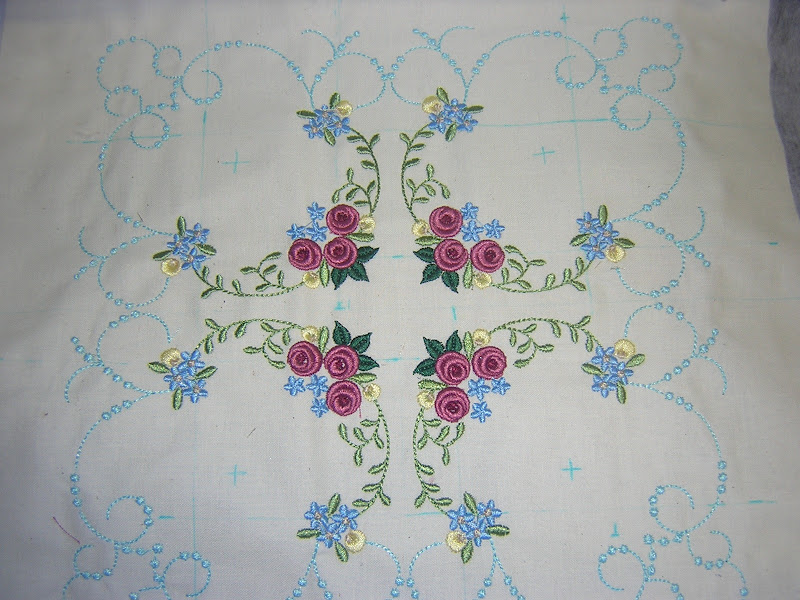
Here's what I've done for doing my quilt block. I'm no expert by any means but it has worked for me. Embird lets you set your design anywhere and gives you X/Y coordinates. I set my design at -.50x1.5 inches so that it fits directly in the corner. The rest of the design is white so you can't see it. The next template I made I used brown.
From Blogger Pictures

I marked the center of the design and the center lines of the hoop. I also marked the edge of the design so I know where to place it on the fabric. That really helped with accuracy big time.

I cut out a 12x12 square of fabric and marked the center lines. I like even numbers..LOL.

1. Using the marked lines of the template I lined them up with the marked lines of the fabric. The marked line at the bottom of the design is used. NOT the hoop center line.

2. I marked the center of the design in all 4 squares. Next I marked the center lines of the template for use of the center marks of the hoop.

3. Using the center lines I hoop the fabric and then move the needle over to the center cross hairs and stitch out the design. I did this with all 4 sides of the fabric. It works! Here it is:

From Blogger Pictures

I made this picture larger so you can see the center of the design marks and then the hoop line marks. It's not completely perfect as I tried out the plastic template that came with my hoop. It's not lined right as I discovered. Just use the marks that come with hoop.

My next set of templates have the white design as dark:

From Blogger Pictures

I haven't darkened the lines yet.

I have also been working on these:

From Blogger Pictures
They are part of a set of 9 blocks that have wonderful sayings about family. I plan to make them into a quilted wall hanging. I put batting underneath the fabric and will add the backing later.